
How to Generate a Property Report (PDF)
Once you’ve located the property and opened the Property Report details, you can generate one of three available PDF reports. After the report is generated, it will appear in your Downloads, where you can choose to save, print, or email it.
Generate a PDF Property Report
- In the Property Report toolbar, select the Print PDF icon.
- A window will open with three report options.
Available PDF Report Options
-
My Property Report
Generates a PDF based on your Preferences settings in My Account in GeoWarehouse.- You can customize which items appear in the report by selecting Customize.
-
Client Report
Generates a PDF that excludes Owner Names and Legal Descriptions, making it suitable for sharing with clients.- The report content can be adjusted by selecting Customize.
-
Basic Client Report
Generates a one‑page PDF designed for clients.- Includes only essential property information and cannot be customized.
Once generated, you can access the report from your downloads to share or print as needed.
To view the video on how to print a property report, click HERE
Comments
6 comments
For some reason I am unable to save the pdf of properties, comes up as an error. I use this option continuously and have checked my computer and all is good with it. Has something changed on your end?
Jim Stephenson
jimstephenson@coldwellbanker.ca
Good Morning Jim,
Thank you for your message. I am sorry to hear you are experiencing issues.
I have opened a ticket to further investigate and will send you a separate email. In future feel free to send your request to geowarehouse.support@teranet.ca as we will need more information to resolve your issue.
I hope you have a wonderful day.
Did you receive an answer. I am trying the same thing and all I can save it as is a HTML file. If I do it will not open.
There has been a recent update to Chrome in which users are reporting this issue. If you are using Chrome, please follow the workaround for the time being while we investigate.
Once you have your report up and ready to download, instead of selecting the drop-down arrow, there is a printer icon right beside it like below:

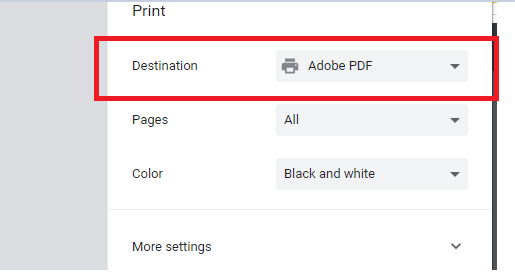
It will bring up the print function and from there make sure to change the destination to Adobe PDF like below:
Now you can save the PDF to your computer and open it up from the file location.
Cannot email A COMPARABLE report
Cannot save as a PDF
USED TO BE ABLE NOW WHAT HAS CHANGED ????
So very frustrating thing keep getting changed NOT for the better
Hi Ursula,
I am sorry to hear that you are having issues. What you are experiencing may be related to your browser if you are using Chrome and have extensions installed.
I would suggest that you give us a call at 1-866-237-5937. You can also consider using a different browser in the meantime to see if you receive the results you need.
Thanks
Article is closed for comments.